Active Project  ·  iOS 13 – 17.2.1

ZiGuZa

A free, open-source iOS jailbreak tool built by the ZiGuZa Team — powered by the Coruna exploit. Reverse engineered, virus-scanned, and fully open.

Start Jailbreaking View on GitHub
Reverse Engineered
Virus-Free & Scanned
100% Open Source
Educational Use Only
Alex_M·$10
iPhoneHacker99·$25
JBFanatic·$5
TweakDev_K·$50
Anonymous·$3
ZeroDay_Z·$20
Coruna_Fan·$7
PwnLover·$100
SilverFox_JB·$15
Anonymous·$2
Alex_M·$10
iPhoneHacker99·$25
JBFanatic·$5
TweakDev_K·$50
Anonymous·$3
ZeroDay_Z·$20
Coruna_Fan·$7
PwnLover·$100
SilverFox_JB·$15
Anonymous·$2
What you get

Powerful. Transparent. Free.

Every component is open to audit. No trackers, no backdoors, no strings attached.

🔬
Reverse Engineered
Built by analysing iOS internals from scratch. Every exploit stage is documented and open for peer review.
🛡
Virus-Free & Scanned
Every release is scanned with multiple security tools. Our fully open source code can be audited by anyone.
Coruna Exploit Chain
Multi-stage pipeline: WebKit RCE, PAC bypass, sandbox escape, and privilege escalation for iOS 13–17.2.1.
🎛
Built-in Tweak Manager
Enable or disable Cylinder, FiveIconDock, FloatingDock, MobileGoose, SnOverlay, and StatBar individually.
🌐
Browser-Based
No sideloading, no PC required. Open the URL on your device and tap Start. Clean and frictionless.
📦
Cydia & Sileo
Pick your preferred package manager after jailbreaking to continue installing tweaks from the community.
Compatibility

Supported Devices & iOS

Check whether your device and firmware version are supported before running the tool.

iPhones
  • iPhone XS / XS Max
  • iPhone XR
  • iPhone 11 / 11 Pro
  • iPhone 12 series
  • iPhone 13 series
  • iPhone 14 (A15)
  • iPhone SE 2nd / 3rd
iPads
  • iPad Air 3rd–5th gen
  • iPad mini 5th–6th gen
  • iPad Pro (2018–2022)
  • iPad 7th–10th gen
iOS Versions
  • iOS 13.0 – 13.7
  • iOS 14.0 – 14.8.1
  • iOS 15.0 – 15.7.x
  • iOS 16.0 – 16.7.x
  • iOS 17.0 – 17.2.1
Exploit Stages
  • Stage 1 — WebKit RCE
  • Stage 2 — PAC Bypass
  • Stage 3 — Sandbox Escape
  • Stage 3 — Root (Coruna)
Coming Soon

S0N Exploit & iOS 26 — Something Major Is In Progress

The ZiGuZa Team is actively researching a new exploit chain codenamed S0N. This is very close to achieving full jailbreaks on the versions below. Follow our GitHub for research updates.

iOS 18.0 – 18.7.1 (S0N)
iOS 26.0
iOS 26.4+

iOS 18+(iOS 26.4+) Support is coming soon! Help us speed it up by supporting devleopment, Donate Now and be part of the Jailbreak Community.

Every contribution, however small, makes a real difference to an independent team.

Follow on GitHub
Blog

Research & Updates

Exploit write-ups, release notes, and security research from the ZiGuZa Team.

Loading latest research and updates...

Supporters

Hall of Donors

Thank you to everyone who has supported the project.

P
PwnLover
$100
T
TweakDev_K
$50
i
iPhoneHacker99
$25
Z
ZeroDay_Z
$20
S
SilverFox_JB
$15
A
Alex_M
$10
C
Coruna_Fan
$7
J
JBFanatic
$5
A
Anonymous
$3
A
Anonymous
$2
Open Source

Find Us on GitHub

All research, tools, and code are open for inspection and contribution.

ZiGuZa
Developr developer — tools and tweaks: ZiGuZa.
ZiGuZa Team
coruna
Core exploit engine powering ZiGuZa.
khanhduytran0
34306
Coruna developer — tools and tweaks.
Developer
Nick Chan
Stage contributions and exploit research.
asdfugil
opa334
TrollStore and jailbreak ecosystem.
Contributor
Privacy Policy

Your Privacy Matters

Data Collection

ZiGuZa collects no personal data. The jailbreak tool runs entirely in your browser — we do not collect device identifiers, IP addresses, iOS version data, or usage telemetry.

Local Storage

The app uses localStorage solely to remember your tweak preferences. This data is stored locally on your device and never transmitted anywhere.

Third-Party Services

Clicking the PayPal donation button redirects you to PayPal's own website, which is governed by PayPal's privacy policy. No data is shared with PayPal before your voluntary click.

Educational Purpose

ZiGuZa is created purely for educational, security research, and interoperability purposes. It is not intended for malicious use in any form.

Contact

For privacy questions, open an issue on our GitHub repository.

How to Install

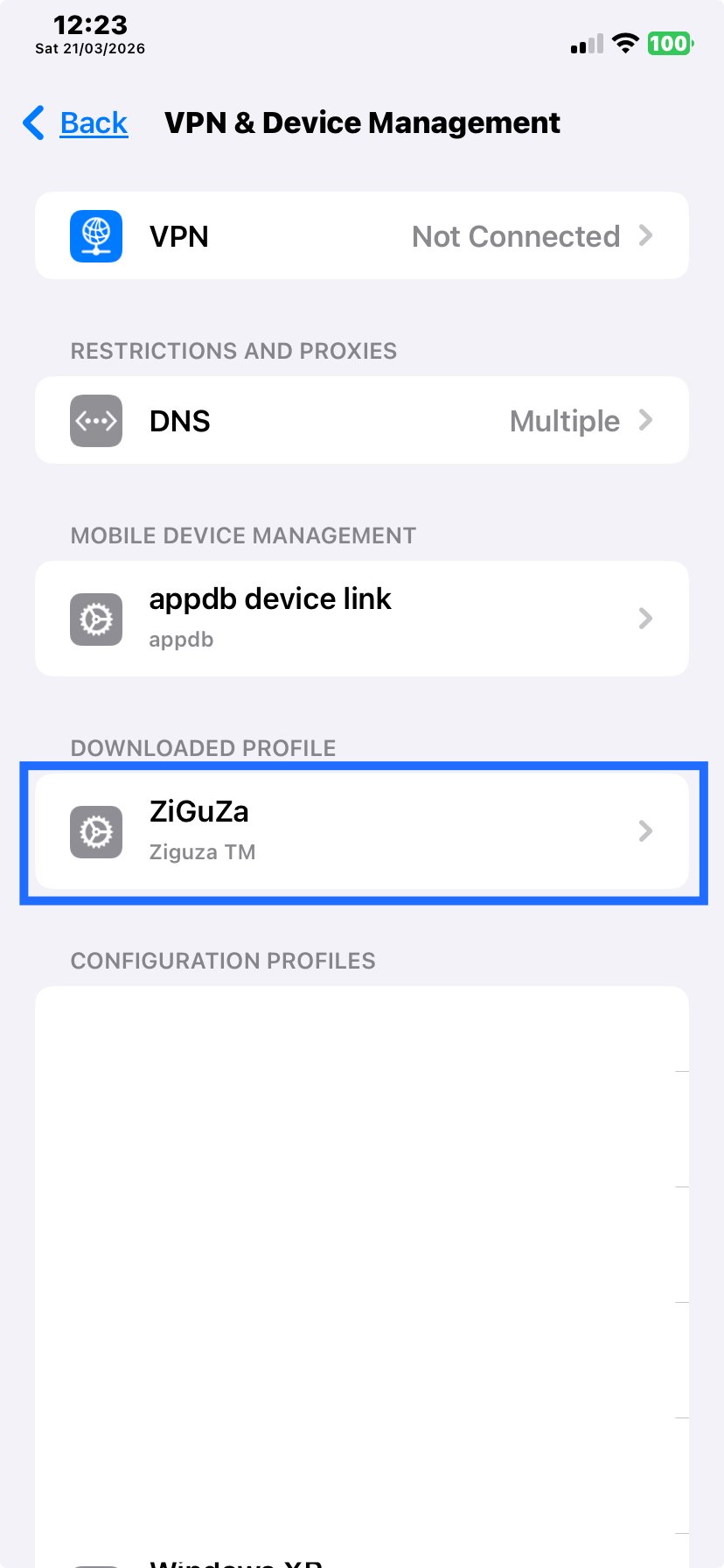
Your profile is downloading. Follow these steps to finish the setup.

1
Open iPhone Settings > General > VPN & Device Management
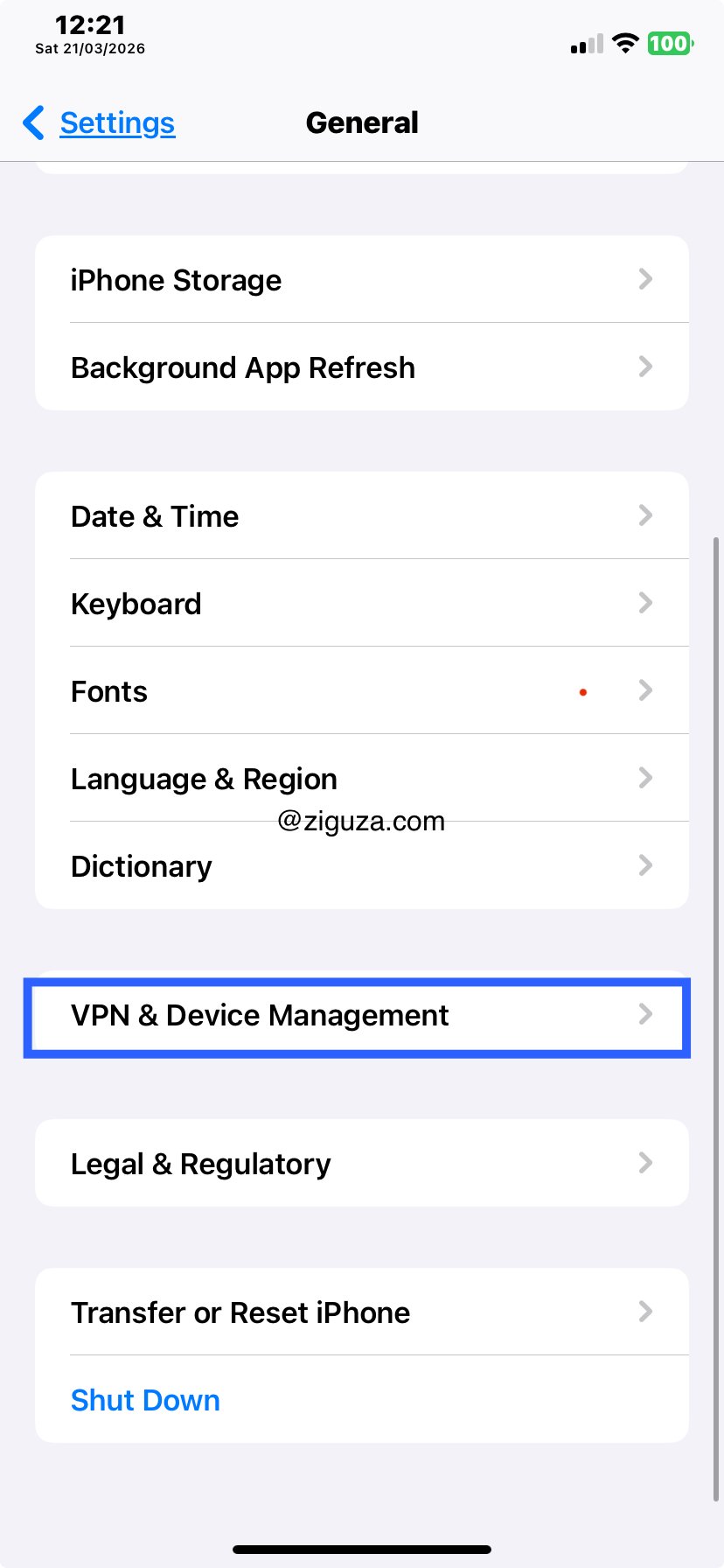
Step 1
2
Select ZiGuZa
Step 2
3
Tap Install and follow on-screen instructions
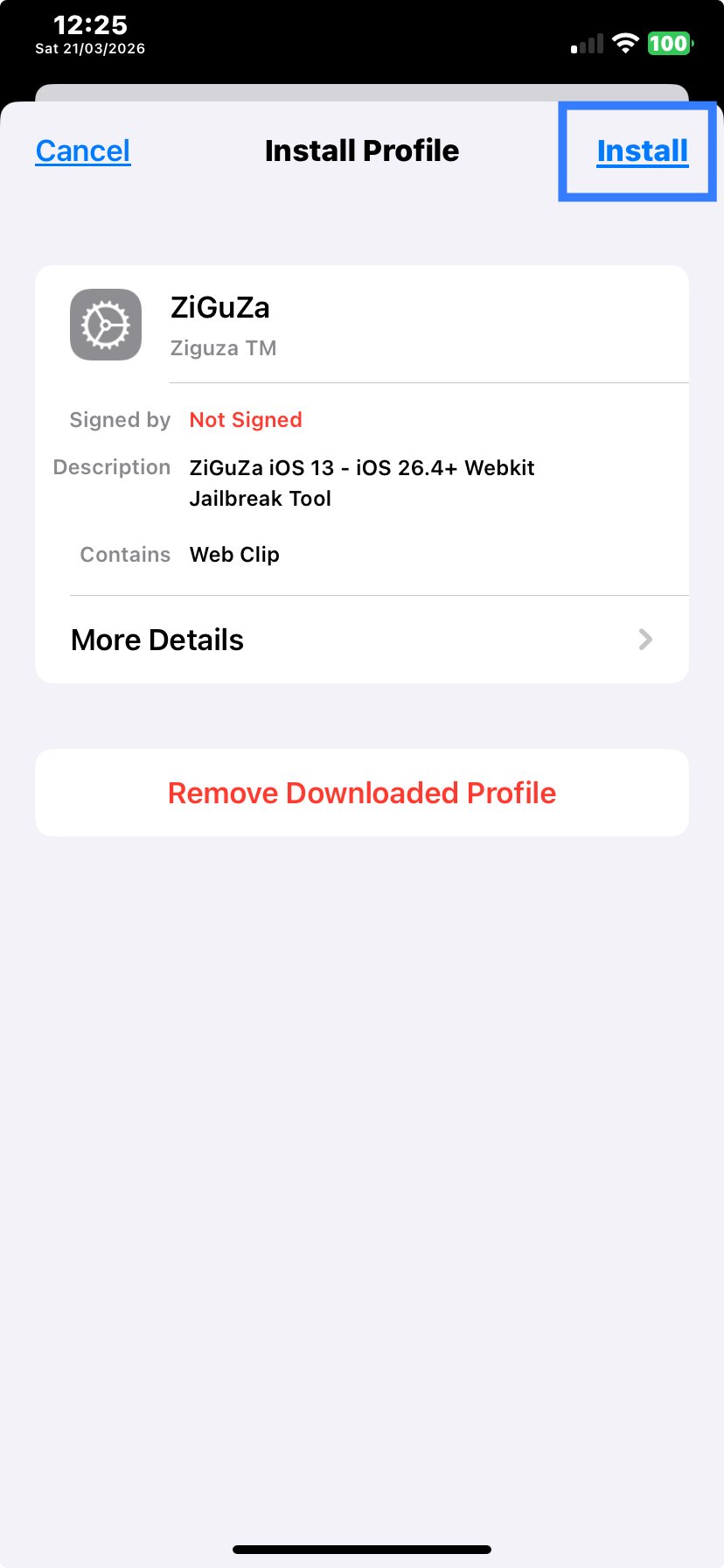
Step 3